tattoos
Showing posts with label Komputer. Show all posts

Tuesday, April 13, 2010

Cara Mudah Backup Driver

Ini ada software yang bisa mem-backup driver2 kita yang ada di windows. Install aja softwarenya lalu lakukan backup dengan mudah. Hal ini dilakukan kalau CD Driver bawaan dari Hardwarenya hilang, dan pada saat itu kita dengan terpaksa harus menginstall ulang komputer karena suatu hal yang benar2 tidak bisa di toleransi lagi.

image

Nama softwarenya DriverMax, silahkan download DISINI. Langsung install, dan lakukan pem-backup-an yak…

Nih Screenshot kalo udah scan driver :

image Tinggal next2 aja… oke… Selamat mem-backup…

Vista Transformation Pack

Share lagi ah, bagi sobat yang ingin menggunakan tampilan dari windows vista, tapi males mau install windows vista coz udah setia ma windows xp, ini ada sebuah software yang merubah tampilan windows xp kita menjadi windows vista, cukup mudah kok penggunaannya, tinggal instal saja, lalu kita dapat menikmati vitur2 windows vista di windows xp.

image

Gak usah kebanyakan bacot dah, keburu dikeroyok masa ntar, hehe… Yang tertarik dan pengen nyoba, Download aja DISINI.

Selamat menikmati dan enjoy yak,,, Thanks dah berkunjung…

Sunday, April 11, 2010

Windows 7 32 Bit Ultimate Red Edition 2010

Nih ada salah satu versi dari Windows 7, file ini saya dapet pas lagi browsing di sebuah forum underground, tepatnya di http://www.palembanghackerlink.org/. Untuk kelemahan dan kelebihan nya saya tidak menguasai, karena saya sendiri bukan pengguna Windows 7 Red Edition ini, tapi saya kemarin setelah mendapatkan file ini, saya langsung melakukan peng-install-an, saya install di VMware, hehhe.. biar g perlu repot partisi harddisk.. hoho.. pengen gampangnya aja…

Sedikit informasi saja, Windows 7 RED Edition ini merupakan Windows 7 yang di khususnya untuk daerah ARAB, karena di bagian Welcome Screen nya tertuliskan sebagai berikut :

image

Ada bahasa arabnya tuh.. gak ngerti… Dan berikut beberapa screenshoot dari bagian2 yang ada :

image

Welcome Screenimage

Desktop

image Explorer

Dan untuk tampilan2 lainnya tidak jauh beda dengan windows 7 Ultimate kok, ya perbedaan2 nya tidak begitu signifikan. Paling2 cuma dari segi icon, themes, dan untuk yang lainnya silahkan di coba yak, kalo gak mau repot mencoba, pake VMware aja dulu, kalo berminat baru di Install di Laptop atau PC sobat…

Langsung saja yak, yg sudah tidak sabar, nih link untuk DOWNLOAD nya :

http://www.slingfile.com/file/vWV0dOplBN
http://www.slingfile.com/file/0rehhp3jds
http://www.slingfile.com/file/LYro2jQ8hd
http://www.slingfile.com/file/fY1I1zZm0I
http://www.slingfile.com/file/nCs7ScYHRS
http://www.slingfile.com/file/6b5SbhnwIK
http://www.slingfile.com/file/hMH1Ilx8BV
http://www.slingfile.com/file/3Mt7vdxMiF
http://www.slingfile.com/file/qPrR961Pph
http://www.slingfile.com/file/tDEsh7pH18
http://www.slingfile.com/file/XKwjDZmE0u
http://www.slingfile.com/file/9okyxEQMav
http://www.slingfile.com/file/VoJzBLAE3e
http://www.slingfile.com/file/HCoYyV45QT
http://www.slingfile.com/file/qTzfxifMLS
http://www.slingfile.com/file/qXfRC8GEEh

Salam blogger, otong.info

Tuesday, January 19, 2010

What Is SQL?

SQL merupakan singkatan dari Structured Query Languange. SQL (sequel) adalah salah satu bahasa yang dikembangkan oleh IBM di San Jose Research Laboratory, dan merupakan bahasa generasi level ke-4. Berbeda dengan bahasa pemrograman level ke-3, SQL adalah bahasa yang bersifat request oriented dan bersifat non-prosedural. Karena hal itu, sehingga SQL mudah dipahami karena sintaks atau perintah yang digunakan hampir mendekati bahasa yang digunakan oleh manusia untuk berkomunikasi. Dalam penulisan sintaks, SQL bersifat non case sensitif, sehingga memudahkan kita dalam mengingat semua sintaks yang ada.

image

SQL banyak digunakan oleh vendor-vendor pembuat DBMS (Database Management System) yang ada di dunia, seperti Microsoft SQL Server, ORACLE, PostGreSQL, MySQL.

SQL terbagi dalam 5 bagian utama, yaitu :

  1. Retrieving Data : perintah untuk menampilkan data dari database. example : SELECT.
  2. DDL (Data Definition Language) : bahasa yang mempunyai kemampuan untuk mendefinisikan data yang berhubungan dengan pembuatan dan penghapusan objek. example : CREATE, DROP, ALTER.
  3. DML (Data Manipulation Language) : bahasa yang berhubungan dengan proses manipulasi data. example : INSERT, UPDATE, DELETE.
  4. DCL (Data Control Language) : bahasa yang berhubungan dengan pengendalian akses ke database. example : GRANT, REVOKE.
  5. DTL (Data Transaction Language) : bahasa yang digunakan untuk mengelola transaksi di database. example : COMMIT, ROLLED BACK.

Thursday, January 14, 2010

Spy Camera Software 2010 8.32

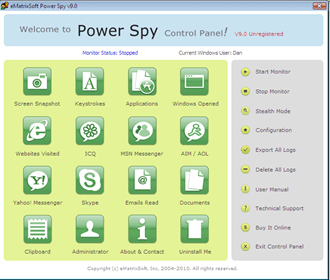
Computer spy software / monitoring software by eMatrixSoft, Spy Camera Software - Invisible keylogger, email and messenger spy software. Perfect for catching cheaters, monitoring employees, children and spouse, acquiring others' passwords, chat records and websites visited, and even investigating crimes.
image

Spy Camera Software lets you know EXACTLY what others do on your PC while you are away. It allow you to secretly monitor and record all activities on your computer, and this is completely legal. Such monitoring acts so stealthily that the user won't know its existence.
It records all keystrokes typed, MSN Messenger, Windows Live Messenger, ICQ messenger, AIM, Yahoo! Messenger, Windows Messenger and Skype's chat text, websites visited, emails read, documents opened, windows opened, clipboard activaties, passwords typed and applications executed . Spy Camera Software even takes screen snapshots at your set interval like a surveillance camera.

In Stealth Mode, it is completely invisible to computer users. However, it is easy for you to unhide its main program Control Panel with your hotkey, view the record secretly from the CP on the monitored computer directly, or receive all logging records via your custom email or ftp server! These reports can be sent as often as you wish, such as every sixty minutes (ajustable). The software can be password protected to prevent others from terminating or uninstalling it.

Download Spy Camera Software 2010 8.32

RemoteSpy Software

Our Top Spy Software for 2010 is RemoteSpy.

RemoteSpy Spy Software and computer monitor has the power to silently and invisibly monitor and record your PC without the need for physical access. Perfect for monitoring your children, employees or any other user of your computer. Insure a child safe internet and enforce employee internet use policy. Record keystrokes (keylogger), screen shots, email, passwords, chats, instant messenger conversations, web sites visited and more in total privacy. Conveniently review the computer monitoring logs online from a secure personalized user account.

Unlike some spy software solutions, Remote Spy features innovative anti-detection routines and a firewall bypassing option unavailable in other remote computer monitoring products. This allows for quick and easy monitoring of your remote or local computer with no extraneous configuration needed.

image

RemoteSpy Monitoring Features

RemoteSpy has a number of remotely capable spy and monitoring features.

  • Internet Conversation Logging - Log both sides of all chat and instant message conversations for AOL/ICQ/MSN/AIM/Yahoo Instant Messengers. Find out who your wife, child or lover is speaking with online.
  • Window Activity Logging - Capture information on every window that were viewed and interacted with for maximum proof. All window titles will be captured secretly.
  • Application Activity Logging - Track every application/executable that was executed and interacted with on your computer. If they open an application it will be recorded.
  • Keystroke Monitoring - Track all keystrokes pressed [including hidden system keys!] and which windows they were pressed in. Keystrokes can also be passed through a formatter for easy viewing/exporting.
  • Web site Activity Logging - Log all web site titles and addresses that were visited on the PC. All information is recorded secretly for you to view anytime! Supported browsers include Internet Explorer, Netscape, and Opera

image

RemoteSpy Advanced Features

RemoteSpy has a number of remote and real-time monitoring features.

  • Individual User Monitoring - RemoteSpy separates all logs by username - perfect for monitoring multiple users of a single computer, or users across multiple computers!
  • Executable Module Creation - Configure your deployable RemoteSpy module easily by using the quick module configuration wizard given to you upon ordering. Point click setup makes it easy to understand and operate.
  • Intuitive Log Viewing - Logs are displayed in chronological order, allowing you to seamlessly toggle between recorded logs if RemoteSpy is recording multiple users, rather than aimlessly back tracking between user accounts.
  • Remote Log Removal - Clear log files remotely, requiring no interaction with the PC. Simply give RemoteSpy the command, and log files will be secretly removed from the Pc you are monitoring!
  • Remote Uninstall - You do not need to physically access the PC in order to stop monitoring. RemoteSpy can be easily erased off the remote machine by a click of a button!
  • Realtime Log Searching - Looking for something in particular, but don't have the time to search through the logs? RemoteSpy offers built in log searching functionality to save you time and energy!

image

RemoteSpy Security and Special Features

RemoteSpy is a silent and secure program that makes tracing the sender virtually impossible.

  • Unbeatable Stealth Capabilities - RemoteSpy offers many levels of stealth capability to prevent the remote user from removing the software. RemoteSpy will not be displayed in the task manager, the process tab (under Windows NT/XP/2000), or anywhere else where it may be possible for the user to detect it!
  • Cloaking Ability - For maximum protection, RemoteSpy will cloak itself - in other words, each time it is executed, it will automatically recreate itself elsewhere on the PC to prevent the software from being removed from the individual being monitored.
  • Password Protection - Your online RemoteSpy member account is securely protected using advanced techniques. No one will have access to your information but you! The only way access is permitted to your RemoteSpy member account is if your username/password is correct - which only you will know!
  • 1 Year Remote Access - Keep up to date with information recorded by RemoteSpy. You can view your logs 24/7/365 via your member account - through any web browser, anytime regardless of whether the remote PC is online or offline! This includes free upgrades! Including free major upgrades and lifetime support.
  • Remotely Deployable - The most notable feature about RemoteSpy - it can be sent remotely via email secretly. Once the Remote Spy file (you create) is executed on a computer, it will continuously record log data on the computer you are monitoring secretly. You can login anytime to your RemoteSpy account to view the recorded data in real-time

RemoteSpy System Requirements

RemoteSpy is fully compatible with Windows 98/2000/ME/NT/XP/Vista and Intel MAC Computers with Windows installed. RemoteSpy is compatible with all browsers. We currently do not support the monitoring of non-Intel based MAC Computers, but you can create your RemoteSpy module and deliver it from a MAC to a Windows-based PC for recording.


image

Tuesday, January 12, 2010

Logon Changer for Windows 7

To you who get bored with the view of the innate Logon Screen Windows 7, you can use a simple tool Logon Changer for Windows 7. This program provides an easy way to change the logon screen display just a few clicks away

To use Logon Changer for Windows 7 is very easy, this application will ask for the location of the image you want to make a further background and will automatically change the logon screen display. You can also immediately see the results by clicking on the menu Test

Microsoft provides an image file size limit of 245 KB which can be used as display logon screen. But with this application you do not have to worry about that limitation, because the application automatically resize and recompress the image with good quality. And the original image untouched.

image If you want to return the display to the default Logon Screen, click on "Revert to Default Logon Screen" and the application will automatically restore it as like the original. This application can also be run without having to install.

image 

Download : Logon Changer for Windows 7

Monday, January 11, 2010

Broadcast Address

Broadcast address refers to the ability to address a message that is broadcast to all stations or hosts on a network. Ethernet networks are shared-media networks in which computers transmit signals on a cable that all other computers attached to the cable can receive. Thus, all the computers are part of the same "broadcast domain."


image

Normally, one computer transmits frames to only one other computer on the network by placing the MAC address of the destination computer in the frame. This frame is then transmitted on the shared media. Even though other computers see this frame on the network, only the target recieves it. A broadcast message is addressed to all stations on the network. The destination address in a broadcast message consists of all 1s (0xFFFFFFFF). All stations automatically receive frames with this address. Normally, broadcast messages are sent for network management and diagnostic purposes.

On IP networks, the IP address 255.255.255.255 (in binary, all 1s) is the general broadcast address. You can't use this address to broadcast a message to every user on the Internet because routers block it, so all you end up doing is broadcasting it to all hosts on your own network. The broadcast address for a specific network includes all 1s in the host portion of the IP address. For example, on the class C network 192.168.1.0, the last byte indicates the host address (a 0 in this position doesn't refer to any host, but provides a way to refer to the entire network). The value 255 in this position fills it with all 1s, which indicates the network broadcast address, so packets sent to 192.168.1.255 are sent to all hosts on the network.

Applications that produce broadcast messages include ARP (used by hosts to locate IP addresses on a network), routing protocols like RIP, and network applications that "advertise" their services on the network.

Auto Reboot On System Crash

By default, when the Windows XP operating system crashes an automatic reboot of the system occurs. While this behavior can be convenient, the downside is the error message accompanying the crash is not visible. Often times this information can be a great help in troubleshooting the source of the crash. This behavior can be modified in two ways; via the registry or using the System Properties property sheet.

  • [Start] [Run] [Regedit]
  • Registry Key: HKEY_LOCAL_MACHINE\SYSTEM\CurrentControlSet\Control\CrashControl
  • Modify/Create the Value Data Type(s) and Value Name(s) as detailed below.
  • Data Type: Dword // Value Name: AutoReboot
  • Setting for Value Data: [0 = AutoReboot Disabled / 1 = AutoReboot Enabled]
  • Exit Registry and Reboot

To avoid the inherent danger of editing the registry, the same results may be  obtained by using the procedure detailed below.

  • Open System Properties via Start
  • Control Panel
  • Performance and Maintenance
  • System [ System Properties may also be opened using the WinKey+Pause key combination ]
  • Select the Advanced tab and then click Settings in the Startup and Recovery section
  • In System Failure section, clear the checkbox next to Automatically Restart
  • Click OK and OK to exit

It should be noted that when you disable the Automatic Restart option you may be presented with the screen below.

image This is most likely to occur if the page file has been relocated to a different drive in order to improve virtual memory performance.

Printer (computing)

In computing, a printer is a peripheral which produces a hard copy (permanent readable text and/or graphics) of documents stored in electronic form, usually on physical print media such as paper or transparencies. Many printers are primarily used as local peripherals, and are attached by a printer cable or, in most newer printers, a USB cable to a computer which serves as a document source. Some printers, commonly known as network printers, have built-in network interfaces (typically wireless and/or Ethernet), and can serve as a hardcopy device for any user on the network. Individual printers are often designed to support both local and network connected users at the same time. In addition, a few modern printers can directly interface to electronic media such as memory sticks or memory cards, or to image capture devices such as digital cameras, scanners; some printers are combined with a scanner and/or fax machine in a single unit, and can function as photocopiers. Printers that include non-printing features are sometimes called Multifunction printers (MFP), Multi-Function Devices (MFD), or All-In-One (AIO) printers. Most MFPs include printing, scanning, and copying among their features.


image

A Virtual printer is a piece of computer software whose user interface and API resemble that of a printer driver, but which is not connected with a physical computer printer. Instead of producing a hard copy of documents on paper (or other print mediums), virtual printers are interfaces for creating PDF files of the printed document, or sending faxes over the telephone using a connected modem.


image

Printers are designed for low-volume, short-turnaround print jobs; requiring virtually no setup time to achieve a hard copy of a given document. However, printers are generally slow devices (30 pages per minute is considered fast; and many inexpensive consumer printers are far slower than that), and the cost per page is actually relatively high. However this is offset by the on-demand convenience and project management costs being more controllable compared to an out-sourced solution. The printing press naturally remains the machine of choice for high-volume, professional publishing. However, as printers have improved in quality and performance, many jobs which used to be done by professional print shops are now done by users on local printers; see desktop publishing. The world's first computer printer was a 19th century mechanically driven apparatus invented by Charles Babbage for his Difference Engine.

Wireless Zero Configuration

Apa yang dimaksut dengan Wireless Zero Configuration?? Sebenarnya saya juga tidak begitu mengerti arti dari WZC tersebut, tetapi yang jelas bisa saya mengerti, jika WZC nonaktif, maka koneksi Wireless kita akan di block, tidak bisa mendeteksi jaringan wireless yang ada. Berikut Screenshot wireless network connection jika WZC nonaktif :

image


Sebenarnya ada dua cara untuk menangani masalah di atas, yaitu :

> Menggunakan software lain untuk melakukan konfigurasi network. Dan biasanya ini merupakan software bawaan dari wireless card yang kita punya.

> Mengaktifkan WZC secara manual dan mengaturnya otomatis start pada saat windows booting.

Kenapa WZC bisa nonaktif otomatis?? biasanya ini merupakan salah satu efek dari virus yang ada dan atau bisa juga karena system kita eror, runtime eror…

Baiklah, langsung saja ketahapan penanganannya, saya coba menggunakan cara yang kedua, yaitu mengaktifkan WZC secara manual.

  • Win + R

image

  • Tuliskan “services.msc” (tanpa quot")

image

  • Lalu OK

image

  • Pada list file, cari “Wireless Zero Configuration”

image

  • Kilk ganda pada “Wireless Zero Configuration”

image

  • Masih pada TAB Generan, lihat menu dropdown “Startup type”, jika tertera selain “Automatic”, misalnya “Manual”, ganti menjadi “Automatic”

image

  • Setelah itu, klik tombol “Start”

image

  • Menunggu Sebentar, dan jika berhasil maka tampilan akan seperti ini :

image

  • Sampai tahapan ini sudah selesai, sekarang coba cek Wireless Network Conection

image

  • Jika sudah tidak ada pesan seperti pada awal tadi, maka WZC telah berhasil aktif dan siap digunakan.

Sekarang Komputer dan atau Laptop sobat kakak sudah bisa digunakan untuk akses internet wireless lagi… Semoga bermanfaat… :)

Friday, January 8, 2010

Free Ubuntu Linux CD For You

Ubuntu gratis??? mau donk.. Hehhe… Sobat mau gak??? Ini ada sebuah cara untuk mendapatkan CD ubuntu gratis… Lumayan kan buat koleksi, hehhe… Tapi memang ada kekurangannya, CD Ubuntu akan dikirim ke alamat kita dengan jangka waktu 4 sampai 6 minggu, tergantung jarak lokasi sobat dan wilayah teritorial negara sobat, ya memang harus sabar sih… Dan artikel ini bukan mau menyarankan sobat untuk ikut mendaptkan, tapi hanya sekedar informasi saja.

image

Tenang kakak, ini bukan program reveral atau apalah yang mencari keuntungan dari tiap member yang mendaftar, ini murni hanya informasi. Untuk mendapatkannya cukup mudah, silahkan perhatikan langkah-langkah berikut :

image

  • Klik Log In / Register yang ada di sebelah kiri Site, untuk menjadi member
  • Masukan e-mail sobat, password kosongkan saja
  • kemudian “Do you have a Launcpad password? Pilih “No, I want to create an account now” karena kita akan mendaftar menjadi member.

image“

  • Then, Continue

image

  • Proses pendaftaran email telah selesai, sekarang cek email sobat untuk melihat email confirmasi.
  • Klik link yang disediakan untuk melakukan proses confirmasi email.

image

  • Isikan Nama sobat pada Display Name
  • Beri centang pada “Hide my email……” Jika sobat ingin menyembunyikan email dari tampilan
  • Buat password pada “Create password” dan tuliskan konfirmasi passwordnya pada “Retype the passeord”
  • Lalu, Continue

image

  • Isikan data diri sobat dengan benara pada form yang disediakan, lalu Submit Request.
  • Jika sukses maka akan muncul pesan berikut pada bagian atas form :

image

CD yang kita dapatkan hanya 1 buah CD Ubuntu untuk PC, sebenarnya kita bisa mendapatkan lebih dari satu, tapi harus ada alasannnya. Kalau memang mau, Silahkan klik link “special request” dibawah tulisan “Change your current request”

image

maka akan muncul halaman form baru :

image

  • Masukan Jumlah CD yang sobat butuhkan pada ‘I would like …… CDs”
  • Lalu tuliskan alasan Sobat pada “Why are you requesting these CDs?”
  • Setelah semua terisi dengan benara, klik “Change Request”

Selesai sudah… Silahkan menunggu ya.. hehhe.. saya juga lagi menunggu nih… kalau saya sudah dapet, saya akan buat artikelnya… hoho…

Monday, December 28, 2009

Path Java

Apa sih itu path java??? path java itu sebenarnya sebuah cara dimana agar command prompt bisa mengenal aplikasi java dan kemudian bisa mengcompile dan atau menjalankan sebuah script bahasa pemrograman java yang kita buat. Tetapi sebelum kita melakukan path java, di dalam komputer kita harus sudah terinstall yang namanya aplikasi jdk. Untuk aplikasi jdk, sobat bisa DOWNLOAD DISINI.

jika komputer kita belum di path, maka jika kita ketikan “javac” (tanpa kutip) pada CMD, hasilnya akan seperti gambar berikut :

image ada keluaran yang menjelaskan bahwa “javac” merupakan external command, atau sama saja dengan cmd tifak mengenal perintah “javac”.

tetapi jika komputer kita sudah di path, maka jika kita ketikan “javac” akan ada keluaran seperti pada gambar berikut :

image Baiklah, untuk melakukan path, silahkan ikuti langkah-langkah berikut :

  • pastikan bahwa jdk sudah terinstall, jika seudah terinstall maka ada sebuag folder bernama “java” (tanpa kutip) pada program file di drive C:

image

  • Buka folder tersebut, ada 2 folder lagi dan kemudian buka folder yang ada kata jdk-nya

image

  • didalam folder tersbut ada beberapa file dan folder, buka folder yang bernama “bin” (tanpad kutip)

image

  • lalu copy address dari folder tersebut, yang ada di address bar explorer

image

  • Setelah itu klik kanan pada My Computer > Propeties > Tab Advanced

image

  • Klik pada “Environment Variables”

image

  • Pada “System variables” cari Variable yang bernama path

image

  • Klik lalu pilih edit (atau Double Click pada path)

image

  • Pada akhir dari alamat yang sudah ada, ketikan tanda titik koma ( ; ) dan lalu paste alamat “bin” yang tadi sudah kita copy pada address bar.

image

  • Akhiri dengan OK, sampai keluar dari properties

Sekarang path sudah berhasil, coba sobat ketikan “javac” pada cmd, maka tampilannya akan seperti berikut :

image

Selamat mencoba dan berkaraya dengan bahasa pemrograman Java…


blogger templates | Blogger