tattoos
Showing posts with label Information. Show all posts

Wednesday, April 14, 2010

Forum Hacker Malingshit Owned by YCL

wkwkwkwk… Senangnya hatiku turun deh emosiku, tapi tetap say FVCK YOU Malingshit… hahahaha…

Kabar sangat membuatku bahagia, yaitu Yogyacarderlink berhasil lagi masuk ke system Forum Hacker Malingshit, tbd.my …. wkwkwkwk… Dua kali deh… Nasib2, dasar maling,.. hahaha…

Kabar ini baru saja saya tahu, maaf terlambat, haha.. pas buka Indonesianhacker.com, eh dapet thread nya, terus lihat kabar detailnya di home nya om Bobyputra : http://bobyputra.com/www-tbd-my-hacked-by-yogyacarderlink.swf

image

Ketawa ngakak… hahahaha… Mastab lah pokoknya… seribu Jempol buat YCL, kalo bisa sih tu forum di hajar sampe matek aja.. haha… Perang tetap berlanjut dah…

Nih ada mirror nya juga, yang mau lihat :

http://www.zone-h.com/mirror/id/10532155

mari bersatu melawan musuh.. Hidup Underground Indonesia..

Greetz :

Yogyacarderlink.web.id

Indonesianhacker.com

Indonesiancoder.com

Indonesiandefacer.org

All Indonesian Forum

Akhir kata, FVCK you Maling…

YM! Multi Messenger 8.x and 9.x

Ini merupakan sebuah software yang bisa membuat YM! kita duo lagin, jadi kita tidak perlu bergantina untuk login 2 account YM! yang kita punya. Sebenarnya cara kerjanya adalah mengedit registy YM! pada windows. Untuk cara manualnya berikut saya sertakan ( tanpa menggunakan software ) :

Masuk pada halaman REGEDIT

cari : Hkey_Current_User → Software → Yahoo → Pager → Test

pada jendela sebelah kanan, klik kanan, lalu new

pilih yang DWORD Value → kasih nama plural

Sudah jadi key nya, lalu double click, dan kasih nilai 1

then, OK

Selesai editing manualnya, coba jalankan YM!, lalu login. Selanjutnya jalankan lagi YM!, dan hasilnya ada dual YM! yang bisa dijalankan…image

Untuk cara mudahnya, silahkan download software berikut : DISINI atau DISINI.

Share singkat, semoga bermanfaat.

Tuesday, April 13, 2010

Cara Mudah Backup Driver

Ini ada software yang bisa mem-backup driver2 kita yang ada di windows. Install aja softwarenya lalu lakukan backup dengan mudah. Hal ini dilakukan kalau CD Driver bawaan dari Hardwarenya hilang, dan pada saat itu kita dengan terpaksa harus menginstall ulang komputer karena suatu hal yang benar2 tidak bisa di toleransi lagi.

image

Nama softwarenya DriverMax, silahkan download DISINI. Langsung install, dan lakukan pem-backup-an yak…

Nih Screenshot kalo udah scan driver :

image Tinggal next2 aja… oke… Selamat mem-backup…

How to Upload at Megaupload

Megaupload is a free online storage and file delivery service that doesn't require membership. However, members get free online storage space for music, photos, movies and documents up to 50GB, and for a monthly fee you can get up to 250GB. Megaupload makes it easy to share files that are too large to email.

Instructions

Step 1 : Go to the Megaupload website.

Step 2 : Click the "Browse" button next to the "Select file to send" box. Choose the file that you want to upload from your hard drive.

Step 3 : Choose who you would like to send the file to. If you enter a recipient's email and your email, you both receive a link to the file to download it. If you just want to create a link and store the file on the Megaupload server, leave these optional fields blank.

Step 4 : Write a description of the file in the designated box. You can enter your email and a recipient's email, but this is optional.

Step 5 : Select "Send" to start uploading your file. The link address will appear after upload is complete.


Tips & Warnings

Becoming either a free member or premium member provides many benefits for users.

If you entered your email address on the upload page, you will be emailed a link that allows you to delete the file.

You cannot upload a file to Megaupload that is larger than 500MB.

Uploaded files will be deleted after 21 days with no download activity.


Resources

http://www.megaupload.com/

http://www.ehow.com/how_2246689_upload-megaupload.html

Sunday, April 4, 2010

Situs Icon Collection

Sobat mau buat blog atau web??? trus bingung gimana caranya buat icon atau g punya kreasi untuk membuat icon yang cantik??? Sebenarnya g perlu repot, di mbah google kan bnyak tuh icon2 yang di publish, ambil aja, gpp, yang penting halal, kan udah di share. Tapi kalo emang mau yang lebih spesifikasi, dateng aja ke situs yang emang menyediakan kumpulan icon2 menarik buat blog dan web kita. Situsnya http://www.iconfinder.net/

image

Tinggal search aja icon apa yang mau di ambil, misalnya mau cari icon buat home, nah tulisa aja home di kotak pencarian :

image

Lalu submit, maka akan muncul kumpulan icon2 untuk home :

image

Untuk lebih lanjut silahkan hubungi dokter terdekat… hohoho…

Tuesday, January 19, 2010

What Is SQL?

SQL merupakan singkatan dari Structured Query Languange. SQL (sequel) adalah salah satu bahasa yang dikembangkan oleh IBM di San Jose Research Laboratory, dan merupakan bahasa generasi level ke-4. Berbeda dengan bahasa pemrograman level ke-3, SQL adalah bahasa yang bersifat request oriented dan bersifat non-prosedural. Karena hal itu, sehingga SQL mudah dipahami karena sintaks atau perintah yang digunakan hampir mendekati bahasa yang digunakan oleh manusia untuk berkomunikasi. Dalam penulisan sintaks, SQL bersifat non case sensitif, sehingga memudahkan kita dalam mengingat semua sintaks yang ada.

image

SQL banyak digunakan oleh vendor-vendor pembuat DBMS (Database Management System) yang ada di dunia, seperti Microsoft SQL Server, ORACLE, PostGreSQL, MySQL.

SQL terbagi dalam 5 bagian utama, yaitu :

  1. Retrieving Data : perintah untuk menampilkan data dari database. example : SELECT.
  2. DDL (Data Definition Language) : bahasa yang mempunyai kemampuan untuk mendefinisikan data yang berhubungan dengan pembuatan dan penghapusan objek. example : CREATE, DROP, ALTER.
  3. DML (Data Manipulation Language) : bahasa yang berhubungan dengan proses manipulasi data. example : INSERT, UPDATE, DELETE.
  4. DCL (Data Control Language) : bahasa yang berhubungan dengan pengendalian akses ke database. example : GRANT, REVOKE.
  5. DTL (Data Transaction Language) : bahasa yang digunakan untuk mengelola transaksi di database. example : COMMIT, ROLLED BACK.

Thursday, January 14, 2010

Spy Camera Software 2010 8.32

Computer spy software / monitoring software by eMatrixSoft, Spy Camera Software - Invisible keylogger, email and messenger spy software. Perfect for catching cheaters, monitoring employees, children and spouse, acquiring others' passwords, chat records and websites visited, and even investigating crimes.

image

Spy Camera Software lets you know EXACTLY what others do on your PC while you are away. It allow you to secretly monitor and record all activities on your computer, and this is completely legal. Such monitoring acts so stealthily that the user won't know its existence.
It records all keystrokes typed, MSN Messenger, Windows Live Messenger, ICQ messenger, AIM, Yahoo! Messenger, Windows Messenger and Skype's chat text, websites visited, emails read, documents opened, windows opened, clipboard activaties, passwords typed and applications executed . Spy Camera Software even takes screen snapshots at your set interval like a surveillance camera.

In Stealth Mode, it is completely invisible to computer users. However, it is easy for you to unhide its main program Control Panel with your hotkey, view the record secretly from the CP on the monitored computer directly, or receive all logging records via your custom email or ftp server! These reports can be sent as often as you wish, such as every sixty minutes (ajustable). The software can be password protected to prevent others from terminating or uninstalling it.

Download Spy Camera Software 2010 8.32

Tuesday, January 12, 2010

Released Smadav 2010 Rev. 8.0

image

SmadAV 2010 Rev. 8 was released with a variety of new features and improvements that are specific to local eradication of the virus. That features such as Smad-Behavior that can identify new local virus that does not exist in the database SmadAV of his behavior when infecting the system. Smad-Ray that can scan automatically flash when installed within a maximum of 5 seconds. 2010 SmadAV more stable and highly recommended to be combined with international anti-virus because it can only handle SmadAV local virus. Immunization flash (using autorun.inf folder) has been revised and previously there will be a confirmation so you can decide whether a flash is to dikebalkan or not.

image

For information, the virus samples that users uploaded to the site Smadav.net, local spread of the virus are now beginning to fall dramatically in Indonesia. Perhaps this is due to the many local antivirus that can eradicate the local viruses. And also because the users of Windows XP that have been reduced because some had to upgrade its operating system to Windows Vista or Windows 7 a very safe from viruses, especially viral infections locally. The spread of the virus in Indonesia more dominated by the international mobile viruses and malware which certainly can not be overcome SmadAV. You must and it is strongly recommended to use the international anti-virus protection your computer from viruses and malware of this international.

  • Smad-Behavior

Almost all new local virus that still use the local viral techniques to infect the system will be detected by SmadAV. This local virus can be detected from behavior that directly infect the system shortly after executed. So, no problem anymore for SmadAV to prevent new local virus that does not exist in the database.

  • Combined with Antivirus International

SmadAV made with the aim to clean and protect your computer from viruses spread locally that many in Indonesia. So, SmadAV not able to detect the virus internationally. Therefore, if you often surf or often install new programs, you must and it is strongly recommended to install an antivirus to be combined with international SmadAV. SmadAV can be combined with almost all international antivirus. When combined, SmadAV will protect your computer from viruses and local international antivirus that will protect you from viruses as a whole internationally. International's antivirus such as the free is Avira, AVG, or Avast, and that paying such a Kasperksy, Norton, or NOD32.

  • Smad-Ray and immunization Flashdisk

Smad-Ray is a quick scan pendrive (maximum 5 seconds) just after the flash is mounted so that without a long wait you can immediately know if the flash is your local infected or not. Immunization SmadAV flash done by adding the autorun.inf folder on your flash so that the virus that usually infects the flash will be very difficult to spread because of its autorun file can no longer be made on your flash. This immunization will be done after you approve the confirmation of the moment after the flash is attached.

The following is a complete list of improvements SmadAV Rev. 2010. 8

  • The addition of local virus database 23 new and improved some false positive
  • A new heuristic technique that can detect the local virus variants provided with one simple variants existing in-database
  • VBS heuristic technique is more accurate and intelligent increased
  • More stable to be merged with all the international AV (other AV detect the computer and if not there would suggest to get an international AV installed)
  • Scan flash is very fast only 5 seconds (Smad-Ray) is not only scan the outer portion of the flash, but also to all the files in the flash
  • SmadAV Pro is the password does not have access rights to change the registry with SmadAV
  • Notifications (Balloon Tray) beginning at the start-up is not there anymore
  • Smad-perfect behavior and with a new look when he warns the user
  • Confirm the addition autorun.inf folder to immunization flash installed shortly after the flash, the user is free to choose to immunize its flash or not
  • Folder SmadAV Smad-Lock/Brankas no longer automatically added in the FD but must manually via Smad-Lock tab
  • Adding the "more" in SMARTP alerts

Download SmadAV 2010 Rev. 8.0

Translator XP Enterprise

Translator XP Enterprise is a free two-way sentence translation from Indonesian into English and vice versa.

Translator XP is programmed to perform the analysis of sentence translation word for word by trying to approach the rules of the language rules are. Translator XP will check the relationship of words between the words that close together. Hence on every database, every word always ends with a sign (b), (k), (v), (t), (g) or (s) that describe the relevant type of word (noun, adverb, the word work, said bookmark, pronouns or adjectives).

Translator XP Enterprise able to distinguish 5 main tenses are often used as Present, Present Perfect, Past, Future and Present continuous, for both active and passive sentences for the positive pattern, negative and interrogative.image

Translator XP also supports alternative meanings, idioms and specification checking language (eg English for computer, English for engineering, etc.)

Translator XP also provides several educational facilities, which we designated for those who want to learn English in more depth. The facility such as Dictionaries can be added the example sentence, Games, and Text to Voice Converter.

Important features:

  1. High degree of accuracy when translating sentences
  2. Translation speeds reaching 800 characters / second
  3. Built-in grammar (tenses, active voice / passive, gerund, question sentences, etc.)
  4. Support idioms (up to 4 levels)
  5. There is a database of phrases for phrase translation
  6. Two-way translation (English-Indonesian and Indonesian-English)
  7. There is a dictionary word for a quick word search. Also accompanied by example sentences
  8. There is menu text to voice converter
  9. Support English language translation with a special specification for example English for computer, English for engineering, etc.
  10. There are educational games


image

Download : Translator XP Enterprise | Password : nyamukmalam


Installation Translator XP Enterprise :

  • Run SetupTXPENT
  • Then follow the instruction until process installation finished
  • Furthermore run DriverSoftTXP
  • Follow the instruction till finish
  • Software success install

To crack the Program :

  • After you install TranslatorXP
  • Copy a file TranslatorXP.exe into C: \ Program Files \ Translator XP Enterprise, if there is confirmation Replace the file, press yes.
  • Or to not bother, please double click the file: TranslatorXP-Patch.exe
  • After that, run TranslatorXP, click Help – Registration
  • Fill in the data freely
  • Bravo, Now it easier for us who can not speak English in.


Original articles in d60pc.com (Indonesian Version)

Monday, January 11, 2010

The Structure of the Registry

The Registry has a hierarchal structure, although it looks complicated the structure is similar to the directory structure on your hard disk, with Regedit being similar to Windows Explorer.


registry_tree


[font_body]Each main branch (denoted by a folder icon in the Registry Editor, see left) is called a Hive, and Hives contains Keys. Each key can contain other keys (sometimes referred to as sub-keys), as well as Values. The values contain the actual information stored in the Registry. There are three types of values; String, Binary, and DWORD - the use of these depends upon the context.

There are six main branches, each containing a specific portion of the information stored in the Registry. They are as follows:

  • HKEY_CLASSES_ROOT - This branch contains all of your file association mappings to support the drag-and-drop feature, OLE information, Windows shortcuts, and core aspects of the Windows user interface.
  • HKEY_CURRENT_USER - This branch links to the section of HKEY_USERS appropriate for the user currently logged onto the PC and contains information such as logon names, desktop settings, and Start menu settings.
  • HKEY_LOCAL_MACHINE - This branch contains computer specific information about the type of hardware, software, and other preferences on a given PC, this information is used for all users who log onto this computer.
  • HKEY_USERS - This branch contains individual preferences for each user of the computer, each user is represented by a SID sub-key located under the main branch.
  • HKEY_CURRENT_CONFIG - This branch links to the section of HKEY_LOCAL_MACHINE appropriate for the current hardware configuration.
  • HKEY_DYN_DATA - This branch points to the part of HKEY_LOCAL_MACHINE, for use with the Plug-&-Play features of Windows, this section is dymanic and will change as devices are added and removed from the system.

Each registry value is stored as one of five main data types:

  • REG_BINARY - This type stores the value as raw binary data. Most hardware component information is stored as binary data, and can be displayed in an editor in hexadecimal format.
  • REG_DWORD - This type represents the data by a four byte number and is commonly used for boolean values, such as "0" is disabled and "1" is enabled. Additionally many parameters for device driver and services are this type, and can be displayed in REGEDT32 in binary, hexadecimal and decimal format, or in REGEDIT in hexadecimal and decimal format.
  • REG_EXPAND_SZ - This type is an expandable data string that is string containing a variable to be replaced when called by an application. For example, for the following value, the string "%SystemRoot%" will replaced by the actual location of the directory containing the Windows NT system files. (This type is only available using an advanced registry editor such as REGEDT32)
  • REG_MULTI_SZ - This type is a multiple string used to represent values that contain lists or multiple values, each entry is separated by a NULL character. (This type is only available using an advanced registry editor such as REGEDT32)
  • REG_SZ - This type is a standard string, used to represent human readable text values.
Other data types not available through the standard registry editors include:
  • REG_DWORD_LITTLE_ENDIAN - A 32-bit number in little-endian format.
  • REG_DWORD_BIG_ENDIAN - A 32-bit number in big-endian format.
  • REG_LINK - A Unicode symbolic link. Used internally; applications should not use this type.
  • REG_NONE - No defined value type.
  • REG_QWORD - A 64-bit number.
  • REG_QWORD_LITTLE_ENDIAN - A 64-bit number in little-endian format.
  • REG_RESOURCE_LIST - A device-driver resource list.

How To Editing The Registry

The Registry Editor (REGEDIT.EXE) is included with most version of Windows (although you won't find it on the Start Menu) it enables you to view, search and edit the data within the Registry. There are several methods for starting the Registry Editor, the simplest is to click on the Start button, then select Run, and in the Open box type "regedit", and if the Registry Editor is installed it should now open and look like the image below.


image


  • Create a Shortcut to Regedit

This can be done by simply right-clicking on a blank area of your desktop, selecting New, then Shortcut, then in the Command line box enter "regedit.exe" and click Next, enter a friendly name (e.g. 'Registry Editor') then click Finish and now you can double click on the new icon to launch the Registry Editor.

  • Using Regedit to modify your Registry

Once you have started the Regedit you will notice that on the left side there is a tree with folders, and on the right the contents (values) of the currently selected folder.

Like Windows explorer, to expand a certain branch (see the structure of the registry section), click on the plus sign [+] to the left of any folder, or just double-click on the folder. To display the contents of a key (folder), just click the desired key, and look at the values listed on the right side. You can add a new key or value by selecting New from the Edit menu, or by right-clicking your mouse. And you can rename any value and almost any key with the same method used to rename files; right-click on an object and click rename, or click on it twice (slowly), or just press F2 on the keyboard. Lastly, you can delete a key or value by clicking on it, and pressing Delete on the keyboard, or by right-clicking on it, and choosing Delete.


Note: it is always a good idea to backup your registry before making any changes to it. It can be intimidating to a new user, and there is always the possibility of changing or deleting a critical setting causing you to have to reinstall the whole operating system. It's much better to be safe than sorry!

What is the Registry?

What is the Registry?

The Registry is a database used to store settings and options for the 32 bit versions of Microsoft Windows. It contains information and settings for all the hardware, software, users, and preferences of the PC. Whenever a user makes changes to a Control Panel settings, or File Associations, System Policies, or installed software, the changes are reflected and stored in the Registry.

image

The physical files that make up the registry are stored differently depending on your version of Windows; under Windows 95 & 98 it is contained in two hidden files in your Windows directory, called USER.DAT and SYSTEM.DAT, for Windows Me there is an additional CLASSES.DAT file, while under Windows NT/2000 the files are contained seperately in the %SystemRoot%\System32\Config directory. You can not edit these files directly, you must use a tool commonly known as a "Registry Editor" to make any changes.

Importing and Exporting Registry Settings

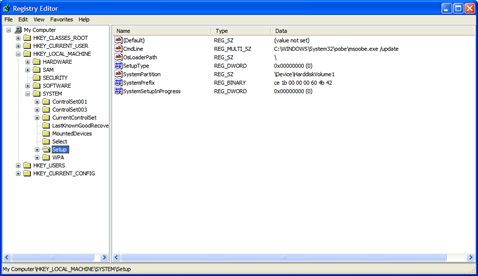
A great feature of the Registry Editor is it's ability to import and export registry settings to a text file, this text file, identified by the .REG extension, can then be saved or shared with other people to easily modify local registry settings. You can see the layout of these text files by simply exporting a key to a file and opening it in Notepad, to do this using the Registry Editor select a key, then from the "Registry" menu choose "Export Registry File...", choose a filename and save. If you open this file in notepad you will see a file similar to the example below:

REGEDIT4

[HKEY_LOCAL_MACHINE\SYSTEM\Setup]
"SetupType"=dword:00000000
"CmdLine"="setup -newsetup"
"SystemPrefix"=hex:c5,0b,00,00,00,40,36,02
image

The layout is quite simple, REGEDIT4 indicated the file type and version, [HKEY_LOCAL_MACHINE\SYSTEM\Setup] indicated the key the values are from, "SetupType"=dword:00000000 are the values themselves the portion after the "=" will vary depending on the type of value they are; DWORD, String or Binary.

So by simply editing this file to make the changes you want, it can then be easily distributed and all that need to be done is to double-click, or choose "Import" from the Registry menu, for the settings to be added to the system Registry.


  • Deleting keys or values using a REG file

It is also possible to delete keys and values using REG files. To delete a key start by using the same format as the the REG file above, but place a "-" symbol in front of the key name you want to delete. For example to delete the [HKEY_LOCAL_MACHINE\SYSTEM\Setup] key the reg file would look like this:

REGEDIT4

[-HKEY_LOCAL_MACHINE\SYSTEM\Setup]

The format used to delete individual values is similar, but instead of a minus sign in front of the whole key, place it after the equal sign of the value. For example, to delete the value "SetupType" the file would look like:

REGEDIT4

[HKEY_LOCAL_MACHINE\SYSTEM\Setup]
"SetupType"=-

Use this feature with care, as deleting the wrong key or value could cause major problems within the registry, so remember to always make a backup first.


  • Regedit Command Line Options

Regedit has a number of command line options to help automate it's use in either batch files or from the command prompt. Listed below are some of the options, please note the some of the functions are operating system specific.

regedit.exe [options] [filename] [regpath]

[filename]
Import .reg file into the registry

/s [filename]
Silent import, i.e. hide confirmation box when importing files

/e [filename] [regpath]
Export the registry to [filename] starting at [regpath]
e.g. regedit /e file.reg HKEY_USERS\.DEFAULT

/L:system
Specify the location of the system.dat to use

/R:user
Specify the location of the user.dat to use

/C [filename]
Compress (Windows 98)

/D [regpath]
Delete the specified key (Windows 98)

Auto Reboot On System Crash

By default, when the Windows XP operating system crashes an automatic reboot of the system occurs. While this behavior can be convenient, the downside is the error message accompanying the crash is not visible. Often times this information can be a great help in troubleshooting the source of the crash. This behavior can be modified in two ways; via the registry or using the System Properties property sheet.

  • [Start] [Run] [Regedit]
  • Registry Key: HKEY_LOCAL_MACHINE\SYSTEM\CurrentControlSet\Control\CrashControl
  • Modify/Create the Value Data Type(s) and Value Name(s) as detailed below.
  • Data Type: Dword // Value Name: AutoReboot
  • Setting for Value Data: [0 = AutoReboot Disabled / 1 = AutoReboot Enabled]
  • Exit Registry and Reboot

To avoid the inherent danger of editing the registry, the same results may be  obtained by using the procedure detailed below.

  • Open System Properties via Start
  • Control Panel
  • Performance and Maintenance
  • System [ System Properties may also be opened using the WinKey+Pause key combination ]
  • Select the Advanced tab and then click Settings in the Startup and Recovery section
  • In System Failure section, clear the checkbox next to Automatically Restart
  • Click OK and OK to exit

It should be noted that when you disable the Automatic Restart option you may be presented with the screen below.

image This is most likely to occur if the page file has been relocated to a different drive in order to improve virtual memory performance.

Printer (computing)

In computing, a printer is a peripheral which produces a hard copy (permanent readable text and/or graphics) of documents stored in electronic form, usually on physical print media such as paper or transparencies. Many printers are primarily used as local peripherals, and are attached by a printer cable or, in most newer printers, a USB cable to a computer which serves as a document source. Some printers, commonly known as network printers, have built-in network interfaces (typically wireless and/or Ethernet), and can serve as a hardcopy device for any user on the network. Individual printers are often designed to support both local and network connected users at the same time. In addition, a few modern printers can directly interface to electronic media such as memory sticks or memory cards, or to image capture devices such as digital cameras, scanners; some printers are combined with a scanner and/or fax machine in a single unit, and can function as photocopiers. Printers that include non-printing features are sometimes called Multifunction printers (MFP), Multi-Function Devices (MFD), or All-In-One (AIO) printers. Most MFPs include printing, scanning, and copying among their features.


image

A Virtual printer is a piece of computer software whose user interface and API resemble that of a printer driver, but which is not connected with a physical computer printer. Instead of producing a hard copy of documents on paper (or other print mediums), virtual printers are interfaces for creating PDF files of the printed document, or sending faxes over the telephone using a connected modem.


image

Printers are designed for low-volume, short-turnaround print jobs; requiring virtually no setup time to achieve a hard copy of a given document. However, printers are generally slow devices (30 pages per minute is considered fast; and many inexpensive consumer printers are far slower than that), and the cost per page is actually relatively high. However this is offset by the on-demand convenience and project management costs being more controllable compared to an out-sourced solution. The printing press naturally remains the machine of choice for high-volume, professional publishing. However, as printers have improved in quality and performance, many jobs which used to be done by professional print shops are now done by users on local printers; see desktop publishing. The world's first computer printer was a 19th century mechanically driven apparatus invented by Charles Babbage for his Difference Engine.

What Is Social Network?

A social network is a social structure made of individuals (or organizations) called "nodes," which are tied (connected) by one or more specific types of interdependency, such as friendship, kinship, financial exchange, dislike, sexual relationships, or relationships of beliefs, knowledge or prestige.


image

Social network analysis views social relationships in terms of network theory consisting of nodes and ties. Nodes are the individual actors within the networks, and ties are the relationships between the actors. The resulting graph-based structures are often very complex. There can be many kinds of ties between the nodes. Research in a number of academic fields has shown that social networks operate on many levels, from families up to the level of nations, and play a critical role in determining the way problems are solved, organizations are run, and the degree to which individuals succeed in achieving their goals.


image

In its simplest form, a social network is a map of all of the relevant nodes between all the nodes being studied. The network can also be used to measure social capital -- the value that an individual gets from the social network. These concepts are often displayed in a social network diagram, where nodes are the points and ties are the lines.

What Is Internet?

The Internet is a global system of interconnected computer networks that use the standard Internet Protocol Suite (TCP/IP) to serve billions of users worldwide. It is a network of networks that consists of millions of private and public, academic, business, and government networks of local to global scope that are linked by a broad array of electronic and optical networking technologies. The Internet carries a vast array of information resources and services, most notably the inter-linked hypertext documents of the World Wide Web (WWW) and the infrastructure to support electronic mail.


image

Most traditional communications media, such as telephone and television services, are reshaped or redefined using the technologies of the Internet, giving rise to services such as Voice over Internet Protocol (VoIP) and IPTV. Newspaper publishing has been reshaped into Web sites, blogging, and web feeds. The Internet has enabled or accelerated the creation of new forms of human interactions through instant messaging, Internet forums, and social networking sites.


image


The origins of the Internet reach back to the 1960s when the United States funded research projects of its military agencies to build robust, fault-tolerant and distributed computer networks. This research and a period of civilian funding of a new U.S. backbone by the National Science Foundation spawned worldwide participation in the development of new networking technologies and led to the commercialization of an international network in the mid 1990s, and resulted in the following popularization of countless applications in virtually every aspect of modern human life. As of 2009, an estimated quarter of Earth's population uses the services of the Internet.


image


The Internet has no centralized governance in either technological implementation or policies for access and usage; each constituent network sets its own standards. Only the overreaching definitions of the two principal name spaces in the Internet, the Internet Protocol address space and the Domain Name System, are directed by a maintainer organization, the Internet Corporation for Assigned Names and Numbers (ICANN). The technical underpinning and standardization of the core protocols (IPv4 and IPv6) is an activity of the Internet Engineering Task Force (IETF), a non-profit organization of loosely-affiliated international participants that anyone may associate with by contributing technical expertise.

What is Multimedia?

Multimedia is media and content that uses a combination of different content forms. The term can be used as a noun (a medium with multiple content forms) or as an adjective describing a medium as having multiple content forms. The term is used in contrast to media which only use traditional forms of printed or hand-produced material. Multimedia includes a combination of text, audio, still images, animation, video, and interactivity content forms.


image

image image image image image

Multimedia is usually recorded and played, displayed or accessed by information content processing devices, such as computerized and electronic devices, but can also be part of a live performance.

Multimedia (as an adjective) also describes electronic media devices used to store and experience multimedia content. Multimedia is distinguished from mixed media in fine art: by including audio, for example, it has a broader scope. The term "rich media" is synonymous for interactive multimedia. Hypermedia can be considered one particular multimedia application.


blogger templates | Blogger